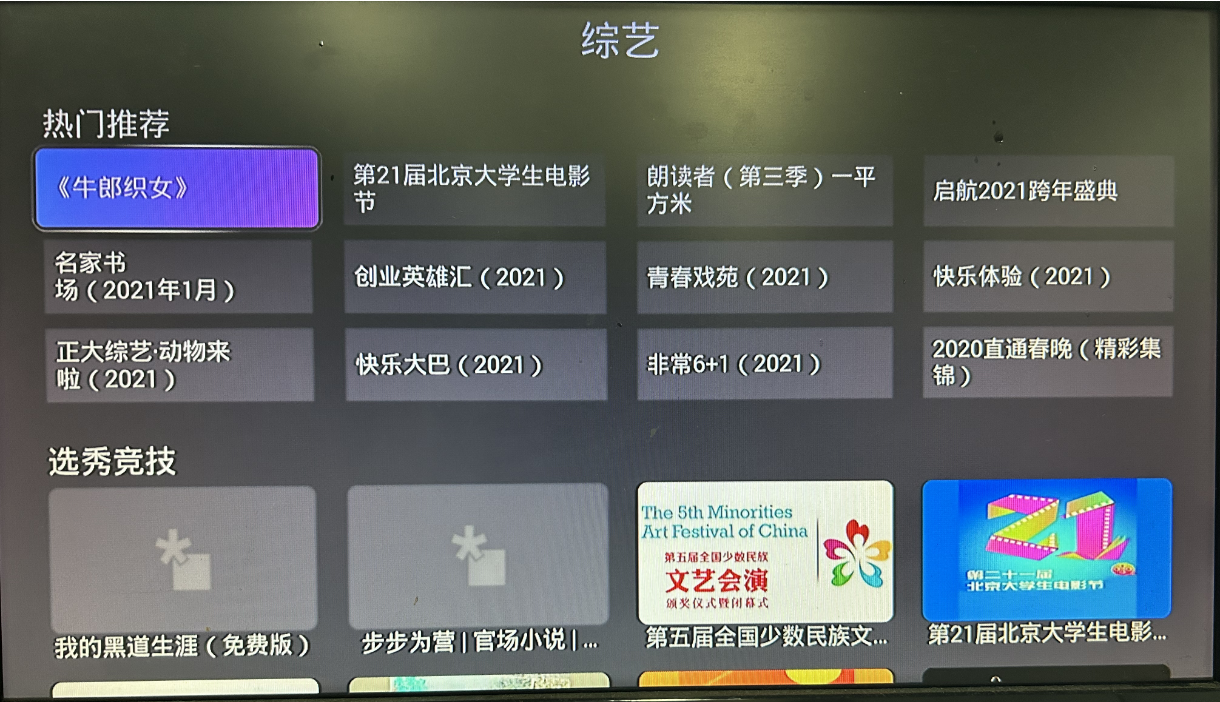
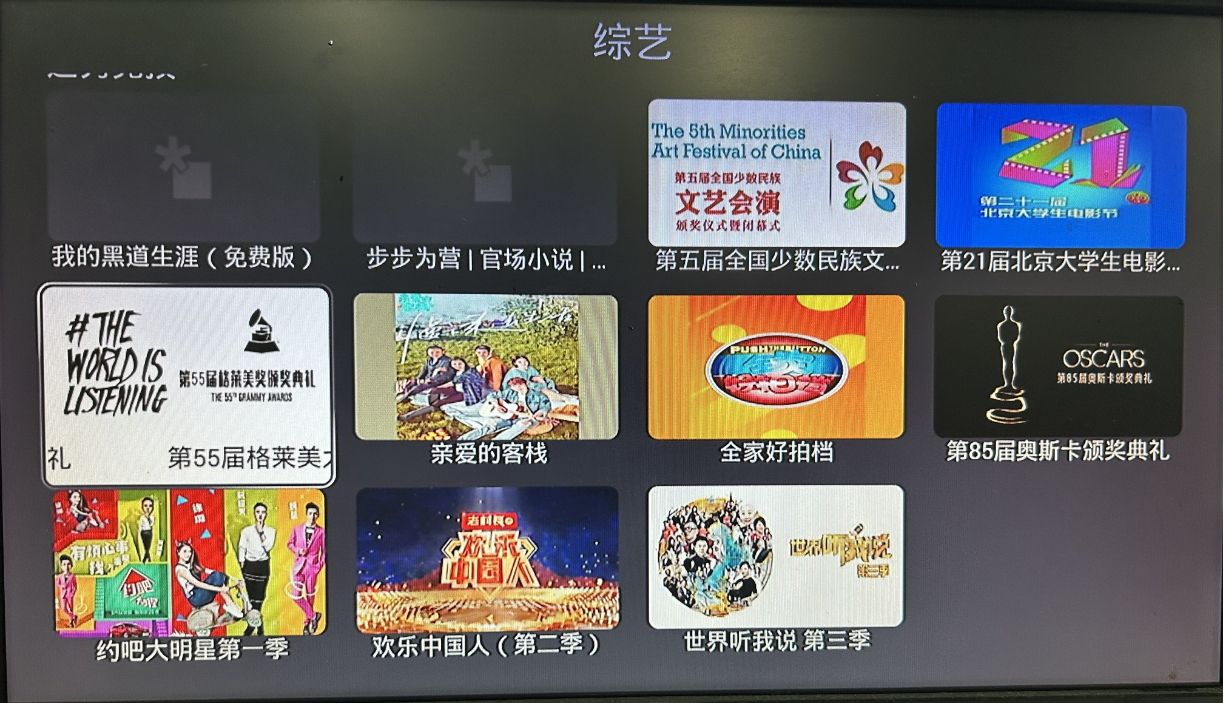
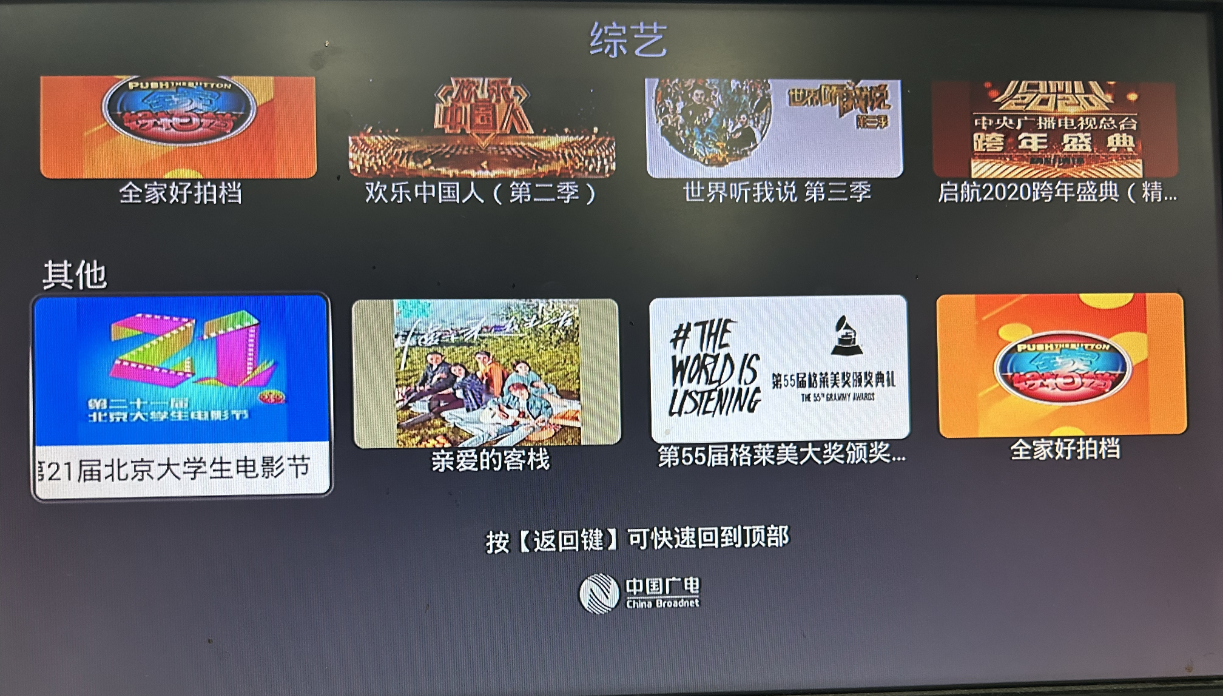
Appearance
4、IPN组件和API使用
- iPanel TV软终端APK支持的私有UI组件和JS功能接口
- 私有接口文档说明:https://doc.ipanel.cn/v/docs/client_apps/react_native/tv_cpnt.html
4.1 使用规则
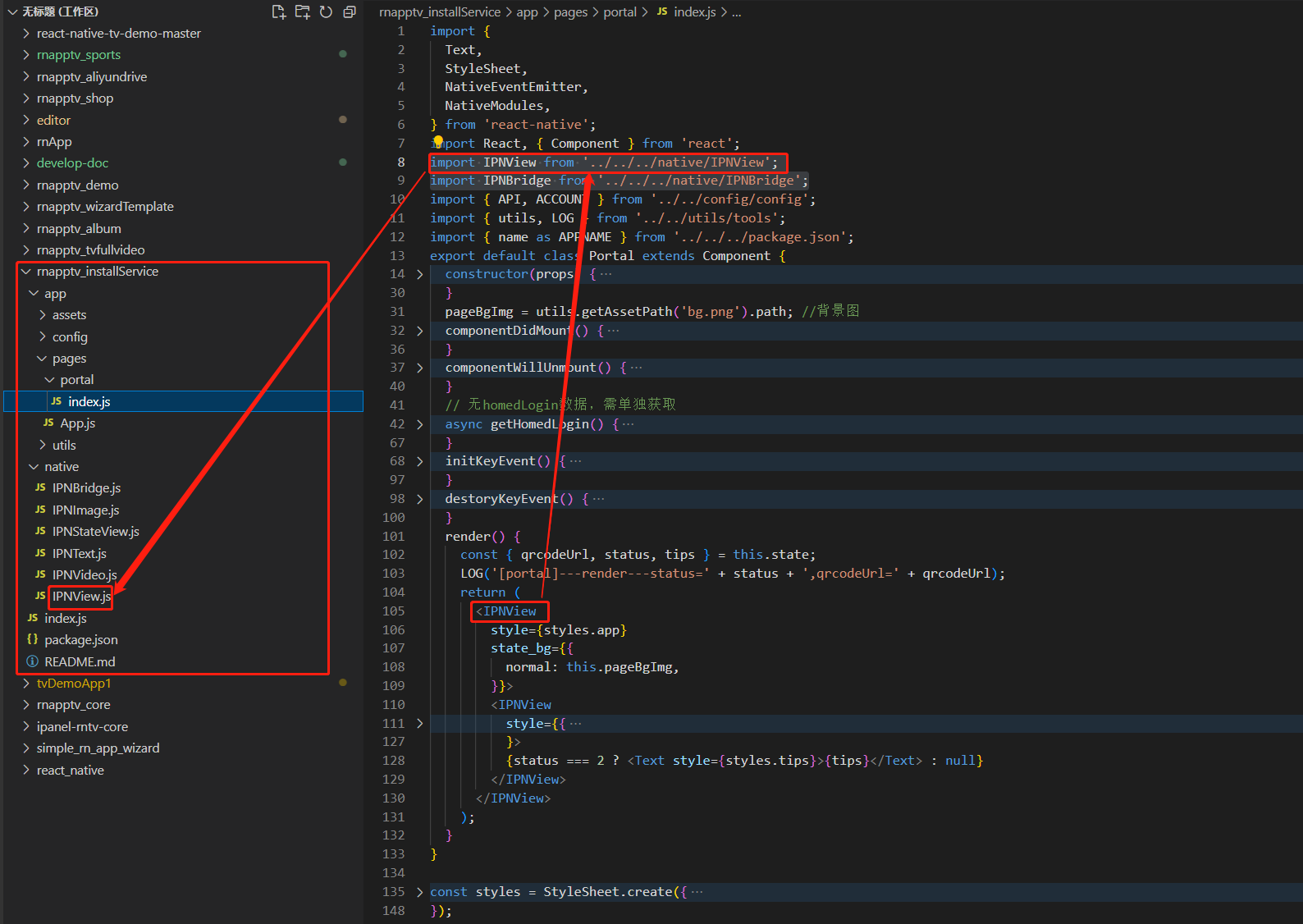
固定目录存放
- 固定存放在仓库根目录的native目录下。如下图:
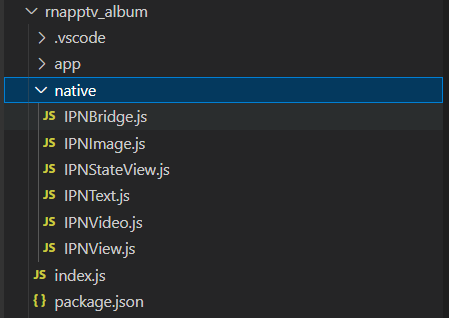
- 该目录文件已经打包在基础包,并内置在APK中。 源码仓存放目的仅为了开发环境(metro)测试使用,不要去修改。并且在依赖安装(npm install)后会自动生成native目录及相关文件
- 固定存放在仓库根目录的native目录下。如下图:
相对路径引用
- 参考代码
javascript//基于当前引用文件存放路径与根目录的native目录的相对路径变化 import IPNView from '../../../native/IPNView'; import IPNStateView from '../../../native/IPNStateView'; import IPNBridge from '../../../native/IPNBridge'; import IPNImage from '../../../native/IPNImage'; import IPNText from '../../../native/IPNText'; import IPNVideo from '../../../native/IPNVideo';- 实例引用参考图
实现原则 同第三方依赖一样,确保原生功能在一个或者多个RN中引用路径是唯一的。实现打包规则的同一文件引用的唯一性。
统一文件调用
- IPNView组件(IPNView.js)
javascriptimport { requireNativeComponent } from "react-native"; module.exports = requireNativeComponent("IPNView");- IPNStateView组件(IPNStateView.js)
javascriptimport { requireNativeComponent } from "react-native"; module.exports = requireNativeComponent("IPNStateView");- IPNImage组件(IPNImage.js)
javascriptimport { requireNativeComponent } from "react-native"; module.exports = requireNativeComponent("IPNImage");- IPNText组件(IPNText.js)
javascriptimport { requireNativeComponent } from "react-native"; module.exports = requireNativeComponent("IPNText");- IPNVideo组件(IPNVideo.js)
javascriptimport { requireNativeComponent } from "react-native"; module.exports = requireNativeComponent("IPNVideo");- IPNBridge对象(IPNBridge.js)
javascriptimport { NativeModules } from 'react-native'; const { IPNBridge } = NativeModules; export default IPNBridge;
4.2 IPN 组件
iPanel TV软终端APK支持的私有UI组件
4.2.1 IPNView
增加自定义焦点显示,焦点查找相关属性。state_bg中引用的图片同软终端APK内存管理机制一致。
- 使用方式javascript
import IPNView from '../../../native/IPNView';//相对路径需根据引用文件路径调整 - 支持属性
//1. 外层焦点样式属性:【scrollView和flatlist也支持设置】 - focus_finder: boolean 启用自定义焦点搜索 - focus_on_selected_first: boolean 焦点优先定位到selected状态的节点 - focus_on_selected_depth: int selected子节点查找层级【20240715测试还不支持】 - focus_selector: object 焦点框设置, 多个子属性 - theme_focus: string Theme中定义的焦点 id,与 URL 二选 一 设置 - url: string 焦点框图片完整url, 必需.9.png结尾的编译后的图 - target_width: number URL 图片对应的屏幕宽度,用于大小缩放 - on_top: boolean 焦点框是否画在子View之上 - force_front: boolean 强制将焦点View 移到绘制顺序的 最上方 - zoom: number 放大焦点View, e.g 0.1 放大 10% - duration: number 焦点动画时间ms, 0 禁止动画 - frame_move: boolean 焦点框移动动画(默认开启) - focus_tag: number 焦点范围计算 0 默认, 1 扩展到上一级View, 2 扩展所有子View到当前View大小, 3 仅扩展selected状态的子View到当前View大小 - blocked_edges: array 取值:['left', 'right', 'up', 'down'],区域内最'left|right|up|down'方向的焦点不再往区域外查找 - shake_edges: array 取值:['left', 'right', 'up', 'down'] - focus_shift_edges: 每个方向对应的动作, 边缘切换动作值枚举定义见后面说明 - left: number 1|4 - right: number 0|5 - up: number 3|7--测试发现3和7是反的 - down: number 2|6 取值说明:【焦点区域内按键方向 按括号内的效果理解】 0 当前焦点区域移到控件最左然后往下查找焦点 (下一行) 1 当前焦点区域移到控件最右然后往上查找焦点 (上一行) 2 当前焦点区域移到控件最上然后往右查找焦点 (右一列) 3 当前焦点区域移到控件最下然后往左查找焦点 (左一列) 4 当前焦点区域移到控件最右然后往左查找焦点 (循环到最右) 5 当前焦点区域移到控件最左然后往右查找焦点 (循环到最左) 6 当前焦点区域移到控件最上然后往下查找焦点 (循环到最上) 7 当前焦点区域移到控件最下然后往上查找焦点 (循环到最下) - nav_repeat_limit: number //方向按键按住时重复事件的最小时间间隔,单位毫秒,低于间隔的按键事件被丢弃 - native_visibility: number //0 visible, 4 invisible还会参与计算, 8 gone不参与布局计算【类似div的visibility效果;invisible太多,会拖慢布局计算速度;4到0是要比8到0快的, 8到0 要重新计算布局大小;】 //2.内层焦点状态(标记)属性: - focusable: boolean 是否参与焦点显示【view标准属性,默认为false,私有焦点基于该属性来实现】 - selected: boolean 设置选中状态 即区域内已选辅焦点(焦点查找优先)【注:尽量用select_on_focus属性替代】 >1、selected设置如果通过rn来改变明显比焦点移动要延迟 >2、selected设置必须在父IPNView标签下的直系(相邻)子标签下才设置有效 - hasTVPreferredFocus: boolean 默认焦点(整个页面只有一个焦点显示【用requestTVFocus替代使用】 - requestTVFocus: boolean 请求焦点当当前View或者可获得焦点的子View - select_on_focus: boolean 获取焦点时自动设置selected的属性,同时清除其他的selected【不会清除该焦点区父节点的兄弟节点焦点区域内的selected属性,需配合select_on_focus_depth来实现】 - select_on_focus_depth: int 自动设置selected状态时 清除其他View的层级,往上查找x级父控件,对其所有子控件再往下查找x级设置状态。0为同级【20240715测试还不支持】 - show_on_states: array //normal, select, focus e.g "show_on_state":['focus','select] 仅在特定状态时显示 - nativeTag: string Native tag 标记, 设有tag标记的focused view被删除时,会尝试恢复focus到同样tag的view上 - long_click: boolean //true 时长按发送onLongClick事件, 此时不会发送onClick事件。短按只发送onClick事件。系统配置时间400ms - conditionFocus: //用于特殊条件焦点处理,如从父控件中抢夺焦点 - type: number // 1 如果当前焦点在父控件时,强制切换焦点到当前view - depth: number // 往上查找父控件的层级, -1 为无限制 - corner_radius: number //对View及其子View进行圆角裁剪 - state_bg: //theme, gradient, http url(focus、select、normal三种状态单独设置) 三选一 - theme: - corner_radius: number - focus: string imgKey in theme - select: string imgKey in theme - normal: string imgKey in theme - gradient: // focus, select, normal - focus: - shape: number // 0 rect, 1 oval - type: number // 0 linear, 1 radia, 2 sweep - orientation: string //'left_right',top_bottom, right_left, bottom_top, tl_br, tr_bl, br_tl, bl_tr - colors: string array //['#112233','#223344'], - cornerRadii: number array // [], //4组 x,y 圆角大小,分别指定各个角的弧度 e.g [10,10,20,20,30,30,40,40] - cornerRadius: number //统一圆角大小 - frameWidth: number //边框宽度 - frameColor: string //'#112233' //边框颜色 - focus: string //http url(IPNText的焦点同外层IPNView焦点是可以共存,互不影响) - select: string //http url - normal: string //http url - 常用用例javascript
import { Text, StyleSheet, View, ToastAndroid } from 'react-native'
import React, { Component } from 'react'
import IPNView from '../../../native/IPNView'//相对路径自行调整

export default class ipnview_focus extends Component {
    render() {
        return (
            <IPNView
                style={styles.app}
                focus_finder={true}//启用自定义焦点查找算法(尽量设置到最外层)
                nav_repeat_limit={1000}///方向按键按住时重复事件的最小时间间隔,单位毫秒,低于间隔的按键事件被丢弃
                // blocked_edges={['left', 'right', 'up', 'down']}//不能移动到页面焦点区域外焦点
                shake_edges={['left', 'right', 'up', 'down']}//触边抖动效果
                state_bg={{//三选一
                    // theme: {normal: 'bg_scale'},//背景图和背景色不能同时在一个IPNView中设置
                    gradient: {
                        normal: {
                            colors: ['#00535f', '#007b8d'],
                            orientation: 'top_bottom',
                        },
                    },
                }}>
                <IPNView
                    style={styles.appBg}
                    state_bg={{//三选一
                        theme: { normal: 'bg_scale' },
                        // normal: 'http://webclient.homed.tv/ipanel/health/bg_scale.png'
                    }}></IPNView>
                {[0, 1, 2, 3].map((index) => (//4列独立的焦点区域(采用了focus_finder 自定义焦点查找算法)。如果其父元素不设置focus_finder,则4列之间焦点查找算法为系统默认查找算法。则selected状态查找不到相邻的。
                    <IPNView
                        key={index}
                        focus_finder={true}//启用自定义焦点查找算法(最外层设置了,内层可以不用再设置)
                        focus_on_selected_first={true}//获焦优先找selected元素
                        focus_selector={{//设置焦点样式
                            theme_focus: 'main',
                            on_top: true,
                            force_front: true,
                            zoom: 0,
                        }}
                        focus_tag={3}
                        corner_radius={index === 1 ? 30 : 0}//第二列区域设置圆角
                        focus_shift_edges={index === 3 ? { up: 3, down: 6 } : {}}//第四列设置上下焦点循环
                        style={styles.list}>
                        {[0, 1, 2, 3, 4, 5, 6, 7, 8, 9].map((subIndex) => (
                            <IPNView
                                key={subIndex}
                                focusable={true}//获焦元素
                                select_on_focus={true}//获焦后自动设置selected状态,同时取消相邻节点selected状态
                                requestTVFocus={!index && !subIndex ? true : false}//默认第一行第一列获焦
                                focus_finder={true}
                                blocked_edges={!index && !subIndex ? ['up', 'down'] : []}//需要同时设置focus_finder才有效果(目前设置第一列第一个焦点,不响应上下按键移动)
                                state_bg={{//三选一
                                    gradient: {
                                        focus: {//获焦背景色
                                            cornerRadius: 10,
                                            orientation: 'left_right',
                                            colors: ['#667EFF', '#BE52EB'],
                                        },
                                        select: {//选中状态失焦背景色(辅焦)
                                            orientation: 'left_right',
                                            cornerRadius: 10,
                                            colors: ['rgba(255,255,255,0.2)', 'rgba(255,255,255,0.2)'],
                                        },
                                    },
                                }}
                                long_click={true}//必须设置在focusable=true的焦点元素上,开启该焦点的长按事件
                                onClick={() => {
                                    console.log('onClick---->')
                                    ToastAndroid.showWithGravity('单按确定键', ToastAndroid.SHORT, ToastAndroid.TOP)
                                }}
                                onLongClick={() => {
                                    console.log('onLongClick---->')
                                    ToastAndroid.show('长长长按确定键了', ToastAndroid.SHORT)
                                }}
                                style={styles.item}>
                                <Text style={styles.text}> {'测试' + index + '-' + subIndex}</Text>
                            </IPNView>
                        ))}
                    </IPNView>
                ))}
            </IPNView>
        )
    }
}
const styles = StyleSheet.create({
    app: {
        flex: 1, justifyContent: 'center', alignItems: 'center', flexDirection: 'row',
    },
    appBg: {
        position: 'absolute', top: 0, bottom: 0, left: 0, right: 0,
    },
    list: {
        width: 200, marginRight: 20, padding: 10, backgroundColor: '#333',
    },
    item: {
        width: '100%', height: 50, justifyContent: 'center', alignItems: 'center',
    },
    text: {
        fontSize: 28, color: '#ffffff',
    }
})
4.2.2 IPNStateView
继承IPNView,复制上一级View的 focus,select 状态。配合show_on_states 属性可以实现相对于IPNText更加灵活的状态显示。state_bg中引用的图片同软终端APK内存管理机制一致。
主要用法
- 1、继承焦点状态。相当于父级focusable=true焦点在IPNStateView上一样,可直接用私有组件的focus、select相关属性设置不同状态效果
- 2、分状态显示隐藏。配合show_on_states:['focus','select','normal'] 属性单独配置不同的IPNStateView,在不同状态下显示不同的IPNStateView,可以实现相对于IPNText更加灵活的状态显示。
使用方式
javascriptimport IPNStateView from '../../../native/IPNStateView';//相对路径需根据引用文件路径调整支持属性
- 支持IPNView所有属性(继承IPNView)
- 增加属性 show_on_states 可以设置它那些状态时显示。如:show_on_states:['focus','select'],可达到相对于IPNText更加灵活的状态显示
- IPNStateView可以嵌套任何其他组件
常用用例
通常用于focusable=true的焦点元素(IPNView)内,不同状态对应不同IPNStateView组件显示。根据show_on_states:['focus'|'select'|'normal']指定。
javascriptimport {Text, StyleSheet, View} from 'react-native'; import React, {Component} from 'react'; import IPNView from '../../../native/IPNView'; import IPNStateView from '../../../native/IPNStateView'; import IPNText from '../../../native/IPNText'; import IPNImage from '../../../native/IPNImage'; const data = [ {name: '中央一台', desc: '001 人与自然'}, {name: '浙江高清卫视', desc: '002 人与自然11'}, {name: '湖南高清卫视', desc: '003 人与自然'}, {name: 'CCTV新闻台', desc: '004 人与自然'}, ]; export default class IPNStateView_focus extends Component { render() { return ( <IPNView style={styles.app} focus_finder={true} focus_selector={{ theme_focus: 'main', on_top: true, force_front: true, zoom: 0, }} focus_tag={3}> {data.map((item, index) => { return ( <IPNView key={index} focusable={true} style={styles.contentItem} state_bg={{ gradient: { focus: { colors: ['#667EFF', '#BE52EB'], orientation: 'left_right', }, normal: { colors: ['#2d473f', '#2d473f'], orientation: 'left_right', }, }, }} corner_radius={10}> {/* IPNStateView继承上层focusable焦点的状态属性可以继续传递给子元素 */} <IPNStateView style={styles.left}> {/* focus和select状态显示内容,并且继续传递IPNText */} <IPNStateView style={styles.contentItemText} show_on_states={['focus', 'select']}> <IPNText height={'66%'} width={'100%'} nativePadding={{left: 10, right: 5, top: 5}} state_color={{focus: '#ffffff',select: '#BE52EB'}} text_style={{ truncate: 'end', lines: 2, gravity: 'center_vertical', }} text={item.name} size={22} /> <IPNText height={'34%'} width={'100%'} nativePadding={{left: 10, right: 5, bottom: 5}} state_color={{focus: '#ff0000',select: '#BE52EB'}} text_style={{ truncate: 'end', lines: 1, gravity: 'center_vertical', }} text={item.desc} size={16} /> </IPNStateView> {/* normal状态显示内容 */} <IPNStateView style={styles.contentItemText} show_on_states={['normal']}> <IPNText height={'100%'} width={'100%'} nativePadding={{left: 10, right: 5, top: 5}} state_color={{normal: '#ffffff'}} text_style={{ truncate: 'end', lines: 2, gravity: 'center_vertical', }} text={item.name} size={22} /> </IPNStateView> </IPNStateView> <IPNImage style={styles.contentItemIcon} source={{ normal: 'ssss', default: 'theme', }}></IPNImage> </IPNView> ); })} </IPNView> ); } } const styles = StyleSheet.create({ app: { flex: 1, justifyContent: 'center', alignItems: 'center', backgroundColor: '#083d73', }, contentItem: { flexDirection: 'row', justifyContent: 'flex-start', alignItems: 'center', width: 240, height: 80, marginVertical: 5, }, contentItemIcon: {flex: 1, width: '100%', height: '100%'}, left: {flex: 3, width: '100%', height: '100%'}, contentItemText: { position: 'absolute', left: 0, top: 0, bottom: 0, top: 0, justifyContent: 'center', }, proDesc: {color: '#999', fontSize: 17}, });
4.2.3 ScrollView扩展
为ScrollView扩展属性,以支持FlashList这类基于ScrollView的控件可以设置IPNView的相关焦点属性
使用方式
javascriptimport {ScrollView} from 'react-native';支持属性
- nativePadding: //仅用于焦点移动计算目标滚动位置计算 - padding: number - left: number - right: number - top: number - bottom: number - focus_finder: boolean 启用自定义焦点搜索 - focus_on_selected_first: boolean 焦点优先定位到selected状态的节点【20240715测试还不支持】 - focus_selector: - theme_focus: string - url: string - target_width: number - on_top: boolean - force_front: boolean - zoom: number - focus_tag: number 焦点范围计算 0 默认, 1 扩展到上一级View, 2 扩展所有子View到当前View大小, 3 仅扩展selected状态的子View到当前View大小 - blocked_edges: array //array of left, right, up, down - noneFocusScroll: number 非焦点变化时,最大滚动距离相对宽或者高的比例。 小于等于0时,禁止非焦点变化的滚动常用用例
使用nativePadding可以控制焦点在scrollview区域中某个位置开始滚动内容
javascriptimport {Text, StyleSheet, ScrollView} from 'react-native'; import React, {Component} from 'react'; import IPNView from '../../../native/IPNView'; const data = [ {name: '中央一台', desc: '001 人与自然'}, {name: '浙江高清卫视', desc: '002 人与自然11'}, {name: '湖南高清卫视', desc: '003 人与自然'}, {name: 'CCTV新闻台', desc: '004 人与自然'}, {name: '北京高清卫视', desc: '005 人与自然11'}, {name: '江西卫视', desc: '006 人与自然'}, {name: 'CCTV-1', desc: '007 人与自然'}, {name: 'CCTV-8', desc: '008 人与自然11'}, {name: 'CCTV电视剧', desc: '009 人与自然'}, {name: '星空卫视', desc: '010 人与自然'}, ]; export default class ScrollView_focus extends Component { render() { return ( <IPNView style={styles.app}> <ScrollView style={{flex: 1, padding: 30, backgroundColor: 'skyblue'}} focus_finder={true} focus_selector={{ theme_focus: 'main', on_top: true, force_front: true, zoom: 0, }} focus_tag={3} nativePadding={{top: 220, bottom: 220, clip: false}} //指焦点移动到距离屏幕顶部220,和底部220时,scrollView的上下滚动条就开始滚动不可见的内容(同style.padding不一样) contentContainerStyle={{justifyContent: 'center'}} showsHorizontalScrollIndicator={false} > {data.map((item, index) => { return ( <IPNView key={index} focusable={true} requestTVFocus={!index ? true : false} style={styles.contentItem} state_bg={{ gradient: { focus: { colors: ['#667EFF', '#BE52EB'], orientation: 'left_right', }, normal: { colors: ['#2d473f', '#2d473f'], orientation: 'left_right', }, }, }} corner_radius={10}> <Text style={styles.text}>{item.name}</Text> </IPNView> ); })} </ScrollView> </IPNView> ); } } const styles = StyleSheet.create({ app: { flex: 1, justifyContent: 'center', alignItems: 'center', backgroundColor: '#083d73', }, contentItem: { flexDirection: 'row', justifyContent: 'flex-start', alignItems: 'center', width: 240, height: 80, marginVertical: 5, }, text: {color: '#ffffff', fontSize: 20, margin: 10}, });
4.2.4 IPNText
支持分状态设置不同样式。 复制上一级View的 focus,select 状态。state_bg中引用的图片同软终端APK内存管理机制一致。
使用方式
javascriptimport IPNText from '../../../native/IPNText';//相对路径需根据引用文件路径调整支持属性
javascript- state_color: - focus: string //#RRGGBB #AARRGGBB - select: string - normal: string - text: string【移到text_style中设置】 - size: number【移到text_style中设置】 - gravity: string //left, right, top, bottom, center, center_vertical, center_horizontal, no_gravity 多个 '|' 分隔 【内容对齐方式,移到text_style中设置】 - nativePadding: - padding: number - left: number - right: number - top: number - bottom: number - text_style: object - truncate: string //start, end, middle, marquee - lines: number //显示行数 - marquee_repeat: number //-1 unlimited - line_space: number //行间距 - text: string // 文本内容 - size: number // 字体大小 - gravity: string - min_ems: number // 最少字符个数 - max_ems: number // 最大字符个数 - alpha: number //0 ~ 1f - bold: boolean // 加粗 - strike: boolean // 中间划线 - skewX: number // 斜体角度 e.g. -0.25 - text_style_focus: object // 支持的属性同text_style, focus状态时使用 - text_style_select: object // 支持的属性同text_style, select状态时使用 - state_bg: //theme, gradient, http url(focus、select、normal三种状态单独设置) 三选一 - theme: - corner_radius: number - focus: string imgKey in theme - select: string imgKey in theme - normal: string imgKey in theme - gradient: // focus, select, normal - focus: - shape: number // 0 rect, 1 oval - type: number // 0 linear, 1 radia, 2 sweep - orientation: string //'left_right',top_bottom, right_left, bottom_top, tl_br, tr_bl, br_tl, bl_tr - colors: string array //['#112233','#223344'], - cornerRadii: number array // [], //4组 x,y 圆角大小,分别指定各个角的弧度 - cornerRadius: number //统一圆角大小 - frameWidth: number //边框宽度 - frameColor: string //'#112233' //边框颜色 - focus: string //http url - select: string //http url - normal: string //http url - native_visibility: number //0 visible, 4 invisible, 8 gone常用用例
javascriptimport {StyleSheet} from 'react-native'; import React, {Component} from 'react'; import IPNView from '../../../native/IPNView'; import IPNText from '../../../native/IPNText'; const data = [ {name: '中央一台', desc: '001 人与自然'}, {name: '浙江高清卫视', desc: '002 人与自然11'}, {name: '湖南高清卫视湖南高清卫视', desc: '003 人与自然'}, { name: 'CCTV新闻台', desc: '004 将新时代改革开放进行到底部门支持煤电低碳化改造项目', }, ]; export default class IPNText_focus extends Component { render() { return ( <IPNView style={styles.app} focus_finder={true} focus_selector={{ theme_focus: 'main', on_top: true,//控制焦点层显示在获焦元素上面还是下面 force_front: true, zoom: 0, }} focus_tag={3}> {data.map((item, index) => { return ( <IPNView key={index} focusable={true} requestTVFocus={index === 1 ? true : false} //默认第二个焦点 style={styles.contentItem} state_bg={{ gradient: { focus: { colors: ['#667EFF', '#BE52EB'], orientation: 'left_right', }, normal: { colors: ['#2d473f', '#2d473f'], orientation: 'left_right', }, }, }} corner_radius={10}> <IPNText height={'66%'} width={'100%'} nativePadding={{left: 10, right: 5, top: 5}} state_color={{ focus: '#ff00ff', select: '#BE52EB', normal: '#ffffff', }} text_style={{//常态状态显示内容 truncate: 'end', lines: 2, gravity: 'right|center_vertical', //垂直居中,水平居右显示 text: item.name, size: 20, }} text_style_focus={{//获焦状态显示内容 truncate: 'end', lines: 2, gravity: 'center_vertical', //垂直居中,多个用‘|’连接(水平没写是,默认居左) text: '> ' + item.name, size: 21, bold: true, //字体加粗 }} /> <IPNText height={'34%'} width={'100%'} nativePadding={{left: 10, right: 5, bottom: 5}} state_color={{ focus: '#ff0000', select: '#BE52EB', normal: '#666666', }} text_style={{//常态时,显示一行,垂直居中,末尾截取 truncate: 'end', lines: 1, gravity: 'center_vertical', }} text_style_focus={{//获焦时,显示一行,垂直居中,滚动显示 truncate: 'marquee', lines: 1, gravity: 'center_vertical', strike: true, //加中间划线 skewX: -0.5, //负数向右倾斜,正数向左倾斜 }} text={item.desc} //不需要根据状态变化内容可以直接写在外面 size={16} //不需要根据状态变化内容可以直接写在外面 state_bg={{//三选一 gradient: { focus: { colors: ['#ffffff', '#ffffff'], orientation: 'left_right', }, }, }} /> </IPNView> ); })} </IPNView> ); } } const styles = StyleSheet.create({ app: { flex: 1, justifyContent: 'center', alignItems: 'center', backgroundColor: '#083d73', }, contentItem: { alignItems: 'center', width: 240, height: 80, marginVertical: 5, }, proDesc: {color: '#999', fontSize: 17}, });
4.2.5 IPNImage
1.支持分状态设置不同图片。 复制上一级View的 focus,select 状态。图片内存管理同软终端APK内存管理机制一致。 2.IPNImage是叶子节点,不能再嵌套其他组件 3.图片回收:setSource null, 或者 sourceRelease=true,或者 IPNImage没有在dom里面渲染 4.三级缓存: 先加载内存里的, 没有的去本地flash里加载,flash也没有去网络下载。内存缓存的大小根据设备的可用内存决定的
使用方式
javascriptimport IPNImage from '../../../native/IPNImage';//相对路径需根据引用文件路径调整支持属性
javascript- source: //theme, gradient, http url 三选一, 同state_bg - default: string // 加载过程中的默认图, 取值为theme时为全局默认图,其他值为theme imgFiles 中对应的key - theme: - corner_radius: number - focus: string imgKey in theme - select: string imgKey in theme - normal: string imgKey in theme - gradient: // focus, select, normal - focus: - shape: number // 0 rect, 1 oval - type: number // 0 linear, 1 radia, 2 sweep - orientation: string //'left_right',top_bottom, right_left, bottom_top, tl_br, tr_bl, br_tl, bl_tr - colors: string array //['#112233','#223344'], - cornerRadii: number array // [], //4组 x,y 圆角大小,分别指定各个角的弧度 - cornerRadius: number //统一圆角大小 - frameWidth: number //边框宽度 - frameColor: string //'#112233' //边框颜色 - focus: string //http url - select: string //http url - normal: string //http url - gif: boolean//gif动图时,同时和activated设置为true - sourceRelease: boolean // true时释放图片资源,false重新加载设置的source - activated: boolean // gif之类的动态图,设置true启动播放,false停止播放 - corner_radius: number // 设置圆角 - native_visibility: number //0 visible, 4 invisible, 8 gone常用用例
动画图设置activated=true后,需要注意:如gif动画,需要在source下增加gif=true。如png动画,需要命名为apng后缀。
javascriptimport {StyleSheet} from 'react-native'; import React, {Component} from 'react'; import IPNView from '../../../native/IPNView'; import IPNText from '../../../native/IPNText'; import IPNImage from '../../../native/IPNImage'; const data = [ { name: '中央一台', poster: 'http://slave.homed.tv/poster/movie/300366170/402x226_1.jpg', }, { name: '浙江高清卫视', poster: 'http://slave.homed.tv/poster/movie/300366171/402x226_1.jpg', }, { name: '湖南高清卫视湖南高清卫视', poster: 'http://slave.homed.tv/poster/movie/300366199/402x226_1.jpg', }, { name: 'CCTV新闻台', poster: 'https://slave.homed.tv/poster/movie/300366402/402x226_1.jpg', }, ]; export default class IPNImageTest extends Component { render() { return ( <IPNView style={styles.app} focus_finder={true} focus_selector={{ theme_focus: 'main', on_top: true, force_front: true, zoom: 0, }} focus_tag={3}> {data.map((item, index) => { return ( <IPNView key={index} focusable={true} requestTVFocus={index === 1 ? true : false} //默认第二个焦点 style={styles.contentItem} state_bg={{ gradient: { focus: { colors: ['#667EFF', '#BE52EB'], orientation: 'left_right', }, normal: { colors: ['#2d473f', '#2d473f'], orientation: 'left_right', }, }, }} corner_radius={10}> <IPNImage style={{width: '100%',height: '100%'}} source={{ normal: item.poster, default: 'theme', //图片未加载出来前显示默认theme里面的图imgFilse里面定义的posterDefault对于图片 }} /> </IPNView> ); })} <IPNView style={styles.top}> <IPNImage activated={true} //动画配置 source={{ // normal: 'http://webclient.homed.tv/ipanel/icon/icon_laoding.apng', //png动画图需以apng为扩展名 normal: 'http://192.168.36.154/app/wangzhib/case/icon_laoding.apng', }} style={{width: 100,height: 100, }} /> <IPNImage activated={true} source={{ gif: true, //gif动画图需添加设置 normal: 'http://192.168.36.154/app/liyq/loading.gif', }} style={{width: 120,height: 20,}} /> <IPNImage activated={true} //动画配置 source={{ theme: {normal: 'live_play_focus'}, //icon_laoding(没有动画,需要旭哥后续看看) }} style={{width: 100,height: 100}} /> </IPNView> </IPNView> ); } } const styles = StyleSheet.create({ app: { flex: 1, justifyContent: 'center', alignItems: 'center', backgroundColor: '#083d73', flexDirection: 'row', }, contentItem: { alignItems: 'center', width: 246, height: 138, marginVertical: 10, marginHorizontal: 10, }, proDesc: {color: '#999', fontSize: 17}, top: { position: 'absolute', left: 0, top: 30, width: '100%', height: 200, justifyContent: 'center', alignItems: 'center', flexDirection: 'row', }, });
4.2.6 IPNVideo
播放器控件
使用方式
javascriptimport IPNVideo from '../../../native/IPNVideo';//相对路径需根据引用文件路径调整支持属性
javascript- src: - url: string //播放地址 - type: number //0 live, 1 vod, 2 tstv - vod_server: string //ngod, telecom, seachange, huawei, isma - vod_flag: number // 1 IP, 2 DVB - paused: boolean 暂停、恢复播放 - volume: float 音量 0~1f - seek: number 单位ms - prop: number 获取特殊属性值, 属性值通过onNativeProp回调 - options: 设置扩展选项KV - scale_type: number 0 原始比例,1 16:9, 2 4:3, 3 全屏【测试发现4:3显示效果不对,最后还是应用根据比例来设置IPNVideo尺寸】 - play_speed: number 播放倍速,0.5 ~ 2支持事件
javascriptonProp: // 播放过程中并没有收到该事件 - prop: number 属性id - value: string 属性值 onVideoPrepared: //一次播放只有一次,相当于播放成功 - width: number 视频宽度 - height: number 视频高度 - duration: number 视频时长,单位ms onVideoProgress:// 每秒一次回调事件(当前播放事件变化) - current: number 当前播放位置,单位ms - duration: number 视频时长,单位ms onVideoError:// 播放异常 - what: number 错误码 - extra: number 额外错误参数 onVideoInfo:// 播放相关信息(暂时也没用) - what: number 事件码值(5222缓冲事件) - extra: number 额外参数值(5222对应百分比0-100) - info: string 事件信息 onVideoEnd:// 播放结束设置播放器属性 主要通过setNativeProps接口实现播放器控件相关属性和方法的设置,先获取ref对象来调用setNativeProps方法。
常用用例
javascriptimport { StyleSheet, View, Text, ImageBackground, Dimensions, BackHandler, TVEventHandler, ToastAndroid, } from 'react-native'; import React, {Component} from 'react'; import IPNVideo from '../../../native/IPNVideo'; import IPNView from '../../../native/IPNView'; const utils = { WIDTH: Dimensions.get('window').width, //应用显示屏幕宽度 HEIGHT: Dimensions.get('window').height, ////应用显示屏幕高度 px: (size, pageWidth = 1920) => { //按1920设计图尺寸进行开发转换 return Math.round(size * (utils.WIDTH / pageWidth)); }, }; export default class IPNVideoTest extends Component { constructor(props) { super(props); this.state = { startTime: 0, //开始时间 endTime: 0, //结束时间 duration: 0, //播放总时长 currentTime: 0, //播放当前时间 sliderWidth: utils.WIDTH * 0.8, showPfbar: false, //pfbar显示标记 playStatus: 0, //0未播放,1播放成功,2暂停,3播放结束 }; } componentDidMount() { console.log('[IPNVideoTest]---componentDidMount---'); this.backHandler = BackHandler.addEventListener( 'hardwareBackPress', this.backHandlerListener, ); this.enableTVEventHandler(); } componentWillUnmount() { console.log('[IPNVideoTest]---componentWillUnmount---'); this.disableTVEventHandler(); this.backHandler?.remove(); //释放返回键事件 clearTimeout(this.pfbarTimeout); } enableTVEventHandler() { this.tvEventHandler = new TVEventHandler(); //监听按键事件:标准的只有方向键和确定键(注意:必须有focusable=true的焦点元素,才能接收到方向键和确定键事件) this.tvEventHandler.enable(this, function (_this, event) { console.log('[play.js]-enableTVEventHandler---event=' + event); if (event && event.eventKeyAction === 1) { const {showPfbar, playStatus} = _this.state; console.log( '[play.js]-enableTVEventHandler--event.eventType=' + event.eventType + ',showPfbar=' + showPfbar + ',playStatus=' + playStatus, ); if (event.eventType == 'left') { if (!showPfbar) { _this.showPFBar(1); } } else if (event.eventType == 'right') { if (!showPfbar) { _this.showPFBar(1); } } else if (event.eventType == 'select') { let cplayStatus = playStatus; console.log('_this.videoRef=' + _this.videoRef); if (playStatus > 0) { if (playStatus === 1) { if (_this.videoRef) { _this.videoRef.setNativeProps({paused: true}); cplayStatus = 2; _this.hidePFBar(); _this.setState({showPfbar: false, playStatus: cplayStatus}); } } else if (playStatus === 2) { if (_this.videoRef) { _this.videoRef.setNativeProps({paused: false}); cplayStatus = 1; _this.showPFBar(1); _this.setState({showPfbar: true, playStatus: cplayStatus}); } } } } } }); } //释放tvEventHandler按键事件 disableTVEventHandler() { if (this.tvEventHandler) { this.tvEventHandler.disable(); delete this.tvEventHandler; } } backHandlerListener = () => { const {showPfbar} = this.state; console.log( '[play.js]---backHandleListener => got back key event-showPfbar=' + showPfbar, ); if (showPfbar) { this.hidePFBar(); return true; //返回键处理完毕,不需要系统再响应 } }; showPFBar(_type) { clearTimeout(this.pfbarTimeout); this.setState({showPfbar: true}); if (_type) { if (_type === 1) { const that = this; this.pfbarTimeout = setTimeout(function () { that.hidePFBar(); }, 5000); } } } hidePFBar() { clearTimeout(this.pfbarTimeout); this.setState({showPfbar: false}); } render() { const { startTime, endTime, duration, currentTime, sliderWidth, showPfbar, playStatus, } = this.state; console.log('render---playStatus=' + playStatus); return ( <View style={styles.container}> <IPNVideo style={styles.screen} ref={(ref) => { this.videoRef = ref; }} src={{ url: 'http://192.168.36.154/homed/demoPC/movieSource/movie0.mp4', type: 1, }} onVideoPrepared={(event) => { //播放成功 let data = event.nativeEvent; //nativeEvent为原生播放器发送的具体消息内容 console.log('IPNVideo---onVideoPrepared---data=', data); const totalTimes = Math.floor(data.duration / 1000); this.setState({ duration: totalTimes, endTime: totalTimes, playStatus: 1, showPfbar: true, }); this.showPFBar(1); }} onVideoError={(event) => { //播放异常 let data = event.nativeEvent; ToastAndroid.show( '播放异常!错误码:' + data.what, ToastAndroid.SHORT, ); }} onVideoProgress={(event) => { //进度通知(每秒一次) let data = event.nativeEvent; // console.log('IPNVideo---onVideoProgress---data=', data); let time = Math.floor(data.current / 1000); // 获取播放视频的秒数 this.setState({ currentTime: time, }); }} onVideoInfo={(event) => { let data = event.nativeEvent; }} onVideoEnd={(event) => { //播放结束 let data = event.nativeEvent; this.videoRef?.setNativeProps({ //重新播放 src: { url: 'http://192.168.36.154/homed/demoPC/movieSource/movie0.mp4?' + new Date().getTime(), type: 1, }, }); }} onProp={(event) => { // let data = event.nativeEvent; }} /> <PFBar data={{ startTime: startTime, endTime: endTime, currentTime: currentTime, duration: duration, sliderWidth: sliderWidth, showPfbar: showPfbar, playStatus: playStatus, }} /> <PauseTips data={{playStatus}} /> </View> ); } } class PauseTips extends Component { shouldComponentUpdate(nextProps, nextState) { //状态变化才刷新 return JSON.stringify(this.props.data) !== JSON.stringify(nextProps.data); } render() { const {playStatus} = this.props.data; console.log('PauseTips---playStatus=' + playStatus); return ( <IPNView style={[styles.pauseBox, {opacity: playStatus === 2 ? 1 : 0}]}> <IPNView style={styles.pauseTips} corner_radius={20}> <Text style={styles.pauseText}>暂停</Text> </IPNView> </IPNView> ); } } class PFBar extends Component { secondToTime(_num) { //把s数换算为时分秒 let timeArr = []; timeArr[0] = Math.floor(_num / 36000); timeArr[1] = Math.floor((_num % 36000) / 3600); timeArr[2] = Math.floor((_num % 3600) / 600); timeArr[3] = Math.floor((_num % 600) / 60); timeArr[4] = Math.floor((_num % 60) / 10); timeArr[5] = Math.floor(_num % 10); let result = '' + timeArr[0] + timeArr[1] + ':' + timeArr[2] + timeArr[3] + ':' + timeArr[4] + timeArr[5]; return result; } /** * React组件的钩子函数之一,该函数会在组件重新渲染之前调用,由函数的返回的bool值决定是否重新渲染组件。 * 1、通过shouldComponentUpdate钩子函数来自定义重新渲染的条件。(props和state变化后是否触发render函数,) * 2、通过继承React官方提供的React.PureComponent类,根据浅比较的规则,组件会自动判断是否重新渲染。(测试无效) * @param {新props} nextProps * @param {新state} nextState * @returns true则更新,false不更新 */ shouldComponentUpdate(nextProps, nextState) { //进度条显示,并且播放数据变化时,才刷新pfbar组件 return ( this.props?.data?.showPfbar && JSON.stringify(this.props.data) !== JSON.stringify(nextProps.data) ); } render() { const {data} = this.props; const currProccessLength = data.duration ? (data.sliderWidth * data.currentTime) / data.duration : 0; return ( <View style={[styles.pfbarBox, {opacity: data.showPfbar ? 1 : 0}]}> <View style={styles.proName}> <Text style={styles.proNameText}>测试视频</Text> </View> <View style={styles.processBox}> <Text style={styles.playTime}> {this.secondToTime(data.startTime)} </Text> <View style={styles.processBar}> <View style={{ backgroundColor: '#74F119', height: '100%', width: currProccessLength, }}></View> <IPNView focusable={true} hasTVPreferredFocus={true} style={{ backgroundColor: '#fff', height: 15, width: 15, top: 0, left: -7, borderRadius: 15, display: 'flex', justifyContent: 'center', }}> <ImageBackground style={styles.currTime} source={{ uri: 'http://192.168.36.154/homed/operator/internet/play/main/pfBar/template3/view1/img/tip0.png', }}> <Text style={[styles.playTime, {paddingBottom: 15}]}> {this.secondToTime(data.currentTime)} </Text> </ImageBackground> </IPNView> </View> <Text style={styles.playTime}>{this.secondToTime(data.endTime)}</Text> </View> </View> ); } } const styles = StyleSheet.create({ container: { flex: 1, backgroundColor: '#000', alignItems: 'center', justifyContent: 'center', }, pfbarBox: { position: 'absolute', bottom: 0, marginBottom: 20, height: utils.px(180), marginHorizontal: 30, backgroundColor: 'rgba(0, 0, 0, 0.7)', borderRadius: 10, }, proName: {paddingVertical: 10, paddingHorizontal: 10}, proNameText: {color: '#fff', fontSize: 22}, processBox: { flexDirection: 'row', alignItems: 'center', paddingHorizontal: 10, height: 20, marginTop: 30, }, playTime: { color: '#fff', fontSize: 16, alignItems: 'center', textAlignVertical: 'center', }, processBar: { backgroundColor: '#8D8D8D', alignItems: 'center', height: 7, flexDirection: 'row', width: utils.WIDTH * 0.8, marginHorizontal: 10, }, currTime: { width: 200, height: 132, position: 'absolute', top: -80, left: -100 + 7, alignItems: 'center', justifyContent: 'center', }, screen: {width: '100%', height: '100%'}, pauseBox: { position: 'absolute', left: 0, top: 0, bottom: 0, right: 0, width: '100%', height: '100%', alignItems: 'center', justifyContent: 'center', backgroundColor: 'rgba(0,0,0,0.5)', zIndex: 99, }, pauseTips: { width: utils.px(160), height: utils.px(160), backgroundColor: 'rgba(0,0,0,0.7)', alignItems: 'center', justifyContent: 'center', }, pauseText: {fontSize: utils.px(60), color: '#ffffff'}, });
作业
- 题目 开发一个RN应用,实现一个首页,获取指定栏目下的二级子栏目上挂载的节目列表,以瀑布流形式呈现。
- 要求 1、首页实现一个栏目id(如:homed一级栏目电影)遍历其一级子栏目下节目列表呈现瀑布流滑动展示,第一个子栏目按最多三行,一行4个节目,只显示节目名称,最多显示2行截取,水平居左,垂直居中显示。其他子栏目按最多三行,一行4个节目,要显示节目海报和名称,海报加圆角,节目名称显示一行,超过结尾带省略号,获焦时滚动。调用https://slave.homed.tv/homed/programtype/get_list?accesstoken=R66B03D58U109F2033K3B9ACA1BIAA1EA8C0P8M2FAF5B3V20A39Z66841A9DA8Q186A3T1O3001001EW17E8B52F3F75F869&label=71968&depth=1&vcontrol=1接口取一级子栏目; 再调用https://slave.homed.tv/homed/program/get_list?accesstoken=R66B03D58U109F2033K3B9ACA1BIAA1EA8C0P8M2FAF5B3V20A39Z66841A9DA8Q186A3T1O3001001EW17E8B52F3F75F869&label=71977&pagenum=12&pageidx=1获取节目列表。 2、accesstoken从IPNBridge.token获取。 3、焦点滑动到瀑布流非第一个子栏目的节目上,按返回键,可滑动到最顶部的第一个节目上。通过BackHandler捕获返回键 4、页面效果如下图